Airlock is a tiny capture surface for the things that fly through your head all day — the call you need to return, the form that's due, the idea you'll lose by lunch. Type it, tag it, and it lands in the right place. Free, on every device you own.
Works in any browser. Adds to your phone's home screen in two taps.
Most task apps make you decide things at capture time: project, due date, priority, subtasks. That friction is exactly why fleeting tasks never get written down.
Airlock asks for one line of text and two yes/no answers, and gets out of the way. Everything else — sorting, scheduling, deleting — happens later, when you're looking at the whole board instead of running between meetings.
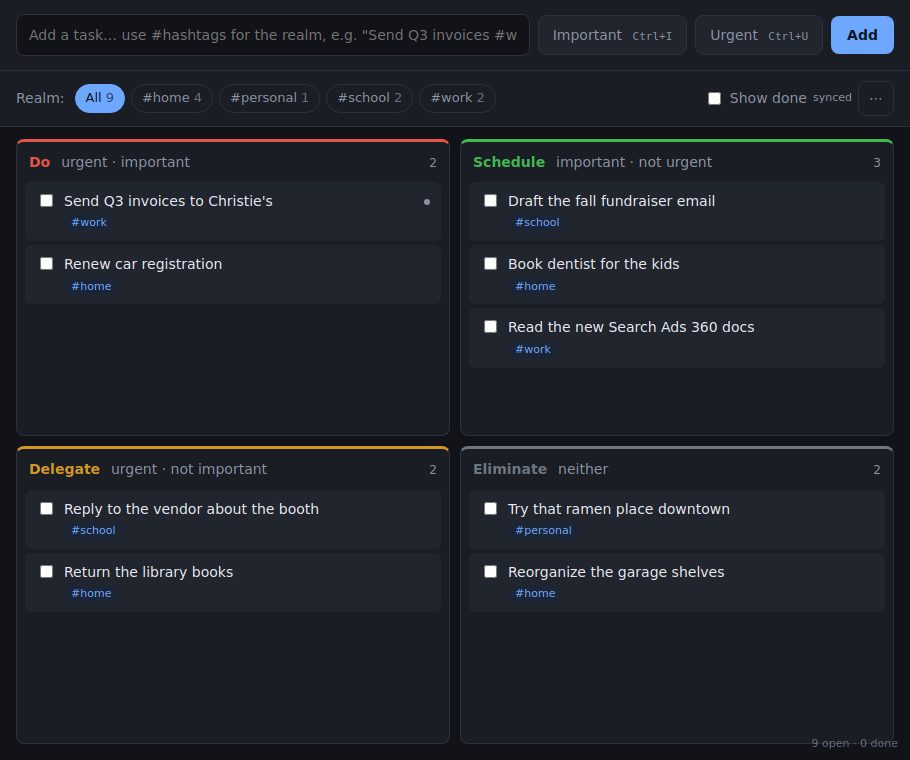
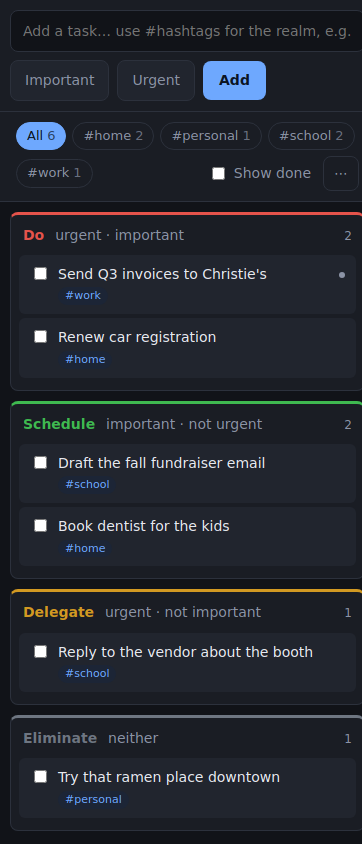
The Eisenhower Matrix is a fifty-year-old sorting rule that still works because it fixes a specific bug in human attention: we treat urgent things as important things. Airlock puts every task in one of four boxes based on two questions.
Urgent and important.
The deadline is today and it matters. Do it now.
Important, not urgent.
The work that moves your life forward and never shouts. Give it a time on the calendar or it will never happen.
Urgent, not important.
Someone needs something now, but it doesn't need to be you. Hand it off, automate it, or do it fast and forget it.
Neither.
Be honest. Most of what lands here should be deleted, and deleting it is the point.
You don't have to think about the boxes while capturing. Flip Important and Urgent on or off and the card sorts itself. Drag it later if you were wrong.
Add a hashtag and the task belongs to a realm: #work, #home, #kids, #taxes, #band, whatever your life is made of. One tap on a realm filters the whole board to that slice, so at your desk you see only work and at the hardware store you see only home.
Realms are created just by using them. Typing # shows the ones you already have.
Text, tags, two toggles, Enter. No fields, no pop-ups, no "create a project first."
Phone, laptop, desktop. Sign in once per device; changes show up on the others in about a second.
No signal? Capture anyway. It syncs when you're back.

Airlock is a web app that installs like a native one. No app store, and updates arrive on their own.
Open the app and sign in with Google or an email code. In Chrome or Edge, click Install in the address bar for a standalone window. In Safari on a Mac, File → Add to Dock.
Open the app in Chrome or Firefox → menu → Add to Home screen.
Open the app in Safari → Share → Add to Home Screen. (Other iPhone browsers can't install web apps.)
Prefer a real app that launches at startup? Download the installer. Windows may warn that the publisher is unknown; choose More info → Run anyway.
Yes. Airlock is a side project from New Orbit Digital. If it ever costs money to run at scale, existing users will hear about it well in advance, and export is always one click.
In a hosted Postgres database (Supabase, US region), isolated per account by database-level rules — one user can't read another's rows, even by mistake. Details in the privacy policy.
Menu → Export my tasks downloads everything as JSON. Delete my account removes it all, immediately.
Yes. Changes queue on the device and sync when you're back online.
The web app installs like one (see above). Native builds may come if people ask.
Justin Bost, who runs a small paid-search agency and got tired of losing tasks between a client call and the school pickup line. Airlock started as a tool for one person and still behaves like one.